
eXperience Pro1.18 - Get APK
You'll be able to download in few seconds.
Publisher Description
APERTURE LABORATORIES proudly presents eXperience Pro.
The eXperience Pro application implements an innovative cross-device and cross-kernel tweak framework which offers a convenient modular approach for Android customizations and tweaks.
With this powerful and exciting new tool users will be able to apply various tweaks on-the-fly and independent of the running kernel. This application will put users in the position to run their favorite tweaks on whichever kernel they prefer without having to convince the corresponding kernel devs to include it. Thus by cutting out the middleman, this app will empower the users and give them a greater control about customization of their devices. Also this software will open up the world of Android tweaking for users that prefer to run the stock kernel.
Try my free eXperience Test app (https://play.google.com/store/apps/details?id=aperture.ezekeel.experiencetest) first to check whether the device and currently running kernel is compatible with the tweak framework employed in eXperience Pro.
Currently over 110 different devices and hardware models are supported. See https://gist.github.com/Ezekeel/5473853#file-experience-pro-supported-devices for a detailed list of all supported devices. If your device is not on the list download my free eXperience Test app which can collect the necessary device-dependent data (no personal information) and send it to the author via email conveniently in one button press.
Currently implemented tweak modules:
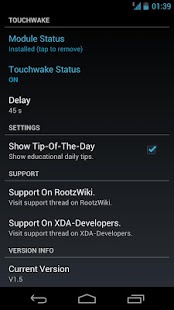
* Touchwake (all devices): When the screen times out (NOT manual lock with power button) one can simply touch the screen to activate it which is much more convenient than pressing the power button - especially great for tablets.
* Music Control (all devices): Control the music playback with the volume buttons. Long press of the volume up button skips to the next song, long press of the volume down button skips back to the previous song (or rewinds the currently playing song). Simultaneous long press of both volume buttons pauses the song or continues playback when paused.
* CPUfreq Control (all devices): Adjust the minimum and maximum CPU frequency step.
* CPU Control (only devices marked with [1]): Add and remove CPU frequency steps and adjust the voltages for the different CPU frequency steps.
* Volume Control (only devices marked with [2]): Adjust the output volume of the headphones and device internal speaker and the input volume of the camcorder and handset microphones.
You can also get this app on Android Pit which accepts Paypal and other payment options: http://www.androidpit.com/en/android/market/apps/app/aperture.ezekeel.experiencepro/eXperience-Pro
*** This application is ONLY for the devices on the list above and you will need root access. ***
About eXperience Pro
The company that develops eXperience Pro is Ezekeel. The latest version released by its developer is 1.18.
To install eXperience Pro on your Android device, just click the green Continue To App button above to start the installation process. The app is listed on our website since 2013-04-27 and was downloaded 0 times. We have already checked if the download link is safe, however for your own protection we recommend that you scan the downloaded app with your antivirus. Your antivirus may detect the eXperience Pro as malware as malware if the download link to aperture.ezekeel.experiencepro is broken.
How to install eXperience Pro on your Android device:
- Click on the Continue To App button on our website. This will redirect you to Google Play.
- Once the eXperience Pro is shown in the Google Play listing of your Android device, you can start its download and installation. Tap on the Install button located below the search bar and to the right of the app icon.
- A pop-up window with the permissions required by eXperience Pro will be shown. Click on Accept to continue the process.
- eXperience Pro will be downloaded onto your device, displaying a progress. Once the download completes, the installation will start and you'll get a notification after the installation is finished.
Program Details
System requirements
Download information
Pricing
Version History
version 1.18
posted on 2013-04-27
Several fixes and updates
version 1.18
posted on 2013-04-27
* Added support for a ton of new devices. Ran out of space in the app description. Will update that at some later point. Use eXperience Test for checking support.,* Added new launcher icon by John Xionidis.
Disclaimer
External Download
We do not host eXperience Pro on our servers. We did not scan it for viruses, adware, spyware or other type of malware. This app is hosted by Galad and passed their terms and conditions to be listed there. We recommend caution when installing it.
The APK Download link for eXperience Pro is provided to you by apps112.com without any warranties, representations or guarantees of any kind, so access it at your own risk.
If you have questions regarding this particular app contact the publisher directly. For questions about the functionalities of apps112.com contact us.
